CLI
The agent-runtimes package provides a command-line interface for starting and managing the Agent Runtimes server.
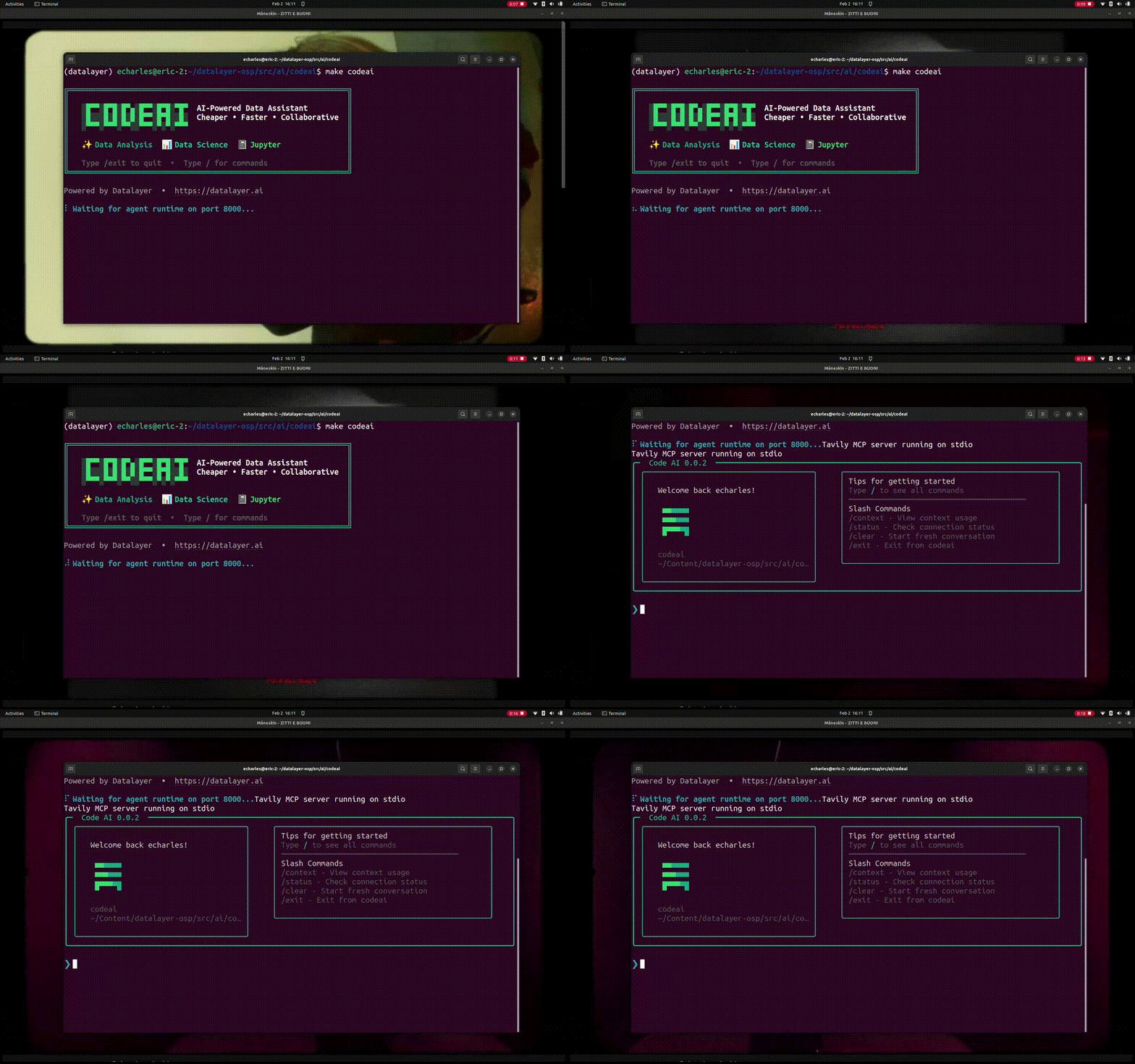
The package also provides an interactive assistant workflow via:
agent-runtimes chat
Interactive Assistant
The interactive assistant experience is part of Agent Runtimes and runs through agent-runtimes chat.
Quick Start
pip install "agent-runtimes[chat]"
agent-runtimes chat
This starts an interactive session with a background agent-runtimes server and the default valid agent spec.
Interactive Mode
Launch without arguments to start a session with the terminal UX (TUX):
agent-runtimes chat
When started without --agentspec-id, the CLI lists available agent specs and lets you choose one interactively.
# Pick interactively
agent-runtimes chat

# Specify an agent spec
agent-runtimes chat --agentspec-id data-acquisition

# Disable codemode
agent-runtimes chat --agentspec-id data-acquisition --no-codemode
Single-Query Mode
Pass a query to run one request and exit:
agent-runtimes chat "What is Python?"
agent-runtimes chat -a crawler "Search for AI trends"
Connect to a Remote Server
Use the connect subcommand to attach to an existing server:
# AG-UI (HTTP/SSE) - default
agent-runtimes chat connect http://localhost:8000/api/v1/ag-ui/chat/

# ACP (WebSocket)
agent-runtimes chat connect ws://localhost:8000/api/v1/acp/ws/chat -t acp
List Remote Agents
agent-runtimes chat agents
agent-runtimes chat agents --server https://agents.datalayer.ai
Slash Commands
| Command | Shortcut | Description |
|---|---|---|
/help | Esc H | Show available commands |
/status | Esc S | Model, tokens, and connectivity |
/context | Esc X | Visualize context usage grid |
/clear | Esc C | Clear conversation history |
/tools | Esc T | List available tools |
/mcp-servers | Esc M | List MCP servers |
/skills | Esc K | List available skills |
/codemode-toggle | Esc O | Toggle codemode on/off |
/agents | Esc A | List agents on the server |
/tools-last | Esc L | Show tool calls from last response |
/context-export | Esc E | Export context to CSV |
/exit | Esc Q | Exit the interactive session |
Banner and Animations
agent-runtimes chat --banner
agent-runtimes chat --banner-all
agent-runtimes chat --eggs
Options Reference
| Option | Short | Default | Description |
|---|---|---|---|
--agentspec-id | -a | interactive picker | Agent spec ID to start |
--port | -p | 0 | Runtime port (0 means random free port) |
--banner | -b | off | Show Matrix rain animation |
--banner-all | -B | off | Show Matrix rain + black hole animations |
--debug | -d | off | Verbose logging |
--no-codemode | off | Disable codemode | |
--eggs | off | Enable Easter egg slash commands | |
--version | -v | Show version info |
Programmatic Usage
Import and customize the embedded assistant agent directly:
from agent_runtimes.chat.cli import agent

@agent.tool()
def my_custom_tool(data: str) -> str:
  return f"Processed: {data}"

agent.to_cli_sync(prog_name="agent-runtimes chat")
Interactive Implementation
The interactive CLI is built on Pydantic AI and Agent Runtimes.
Architecture
┌─────────────────────────────────────────────────────┐
│            Agent Runtimes Interactive CLI           │
│                                                     │
│  ┌──────────┐  ┌──────────┐  ┌───────────────────┐ │
│  │  Typer   │  │  Banner  │  │   Animations      │ │
│  │  (cli.py)│  │  & Colors│  │   (rain, about,   │ │
│  │          │  │          │  │    gif)            │ │
│  └────┬─────┘  └──────────┘  └───────────────────┘ │
│       │                                             │
│  ┌────▼──────────────────────────────────────────┐  │
│  │           Terminal UX (tux.py)               │  │
│  │  • Rich console rendering                    │  │
│  │  • Slash commands + keyboard shortcuts       │  │
│  │  • Context and token visualization           │  │
│  └────┬──────────────────────────────────────────┘  │
│       │                                             │
│  ┌────▼──────────────────────────────────────────┐  │
│  │             AG-UI / ACP Clients              │  │
│  └────┬──────────────────────────────────────────┘  │
└───────┼─────────────────────────────────────────────┘
    │  HTTP/SSE or WebSocket
┌───────▼─────────────────────────────────────────────┐
│              Agent Runtimes Server                 │
│  • Pydantic AI agent with tools                    │
│  • MCP server integration                          │
│  • Codemode (programmatic tool execution)          │
│  • Model routing (Bedrock, OpenAI, etc.)           │
└─────────────────────────────────────────────────────┘
Key Components
agent_runtimes/chat/cli.py: Typer commands, runtime process management, and transport wiringagent_runtimes/chat/tux.py: Rich terminal UX, slash command handling, and streaming renderingagent_runtimes/chat/commands/: slash command modules and registryagent_runtimes/chat/banner.py: brand output and animation helpers
Runtime Flow
agent-runtimes chatresolves an agent spec (provided or interactive picker).- It starts an embedded
agent-runtimes serveprocess. - It waits for
/healththen fetches/health/startup. - Interactive mode launches TUX and streams responses over AG-UI.
- On exit or signal, child processes are terminated cleanly.
Transport Support
- AG-UI (
HTTP/SSE) is the default for local and remote interactive chat. - ACP (
WebSocket) is supported viaagent-runtimes chat connect -t acp.
Slash Command Registry
Slash commands are modularized in agent_runtimes/chat/commands/ and assembled via build_commands(...). This keeps command behavior isolated and easy to evolve.
Packaging
CLI-specific dependencies are defined in agent-runtimes[chat]:
pip install "agent-runtimes[chat]"
The primary user entry point is the agent-runtimes chat subcommand from the main agent-runtimes CLI.
Installation
The CLI is automatically available when you install the package:
pip install agent-runtimes
Commands Overview
The CLI provides seven main commands:
| Command | Description |
|---|---|
serve | Start the agent-runtimes server |
list-agents | Query running agents from a server |
list-specs | List available agent specs from the library |
mcp-servers-catalog | Display MCP servers from the catalog |
mcp-servers-config | Display MCP servers from the user's config |
start-mcp-servers | Start MCP servers for a running agent |
stop-mcp-servers | Stop MCP servers for a running agent |
# Show available commands
agent-runtimes --help

# Or using the Python module directly
python -m agent_runtimes --help
Programmatic Usage
The CLI commands can also be used as a library by other Python packages:
from agent_runtimes.commands import (
    # Serve command
    serve_server,
    ServeError,
    LogLevel,

    # List agents command
    list_agents_from_server,
    ListAgentsError,

    # List specs command
    list_agent_specs,
    get_agent_specs,

    # MCP servers catalog command
    list_mcp_servers_catalog,
    get_mcp_servers_catalog,

    # MCP servers config command
    list_mcp_servers_config,
    get_mcp_servers_config,

    # Agent MCP servers commands
    start_agent_mcp_servers,
    stop_agent_mcp_servers,
    AgentMcpServersError,
    parse_env_vars,

    # Common
    OutputFormat,
)

# Start server programmatically
serve_server(host="0.0.0.0", port=8080)

# Query running agents
result = list_agents_from_server(host="localhost", port=8000)

# Get available agent specs
specs = get_agent_specs()

# Get catalog MCP servers
catalog = get_mcp_servers_catalog()

# Get config MCP servers
config = get_mcp_servers_config()

# Start/stop MCP servers for all agents
start_agent_mcp_servers(env_vars={"TAVILY_API_KEY": "xxx"})
stop_agent_mcp_servers()

# Start/stop MCP servers for a specific agent
start_agent_mcp_servers(agent_id="my-agent", env_vars={"TAVILY_API_KEY": "xxx"})
stop_agent_mcp_servers(agent_id="my-agent")
serve Command
Start the agent-runtimes server.
agent-runtimes serve [OPTIONS]
Options
| Option | Short | Default | Environment Variable | Description |
|---|---|---|---|---|
--host | -h | 127.0.0.1 | AGENT_RUNTIMES_HOST | Host to bind to |
--port | -p | 8000 | AGENT_RUNTIMES_PORT | Port to bind to |
--reload | -r | false | AGENT_RUNTIMES_RELOAD | Enable auto-reload for development |
--debug | -d | false | AGENT_RUNTIMES_DEBUG | Enable debug mode with verbose logging |
--workers | -w | 1 | AGENT_RUNTIMES_WORKERS | Number of worker processes |
--log-level | -l | info | AGENT_RUNTIMES_LOG_LEVEL | Log level (debug, info, warning, error, critical) |
--agent-id | -a | - | AGENT_RUNTIMES_DEFAULT_AGENT | Agent spec ID from the library to start |
--agent-name | -n | default | AGENT_RUNTIMES_AGENT_NAME | Custom name for the agent (requires --agent-id) |
--protocol | -t | ag-ui | AGENT_RUNTIMES_PROTOCOL | Transport protocol (ag-ui, vercel-ai, vercel-ai-jupyter, a2a) |
--no-config-mcp-servers | - | false | AGENT_RUNTIMES_NO_CONFIG_MCP_SERVERS | Skip starting config MCP servers from ~/.datalayer/mcp.json |
--no-catalog-mcp-servers | - | false | AGENT_RUNTIMES_NO_CATALOG_MCP_SERVERS | Skip starting catalog MCP servers defined in the agent spec (requires --agent-id) |
--mcp-servers | -m | - | AGENT_RUNTIMES_MCP_SERVERS | Comma-separated list of MCP server IDs from the catalog to start |
--codemode | -c | false | AGENT_RUNTIMES_CODEMODE | Enable Code Mode: MCP servers become programmatic tools via CodemodeToolset |
--skills | -s | - | AGENT_RUNTIMES_SKILLS | Comma-separated list of skills to enable (requires --codemode) |
--jupyter-sandbox | -j | - | AGENT_RUNTIMES_JUPYTER_SANDBOX | Jupyter sandbox URL with token for code execution (e.g., http://localhost:8888?token=xxx) |
--find-free-port | -f | false | AGENT_RUNTIMES_FIND_FREE_PORT | If the port is in use, find the next available port |
Basic Examples
# Start with defaults (localhost:8000)
agent-runtimes serve

# Start on all interfaces
agent-runtimes serve --host 0.0.0.0

# Start on a custom port
agent-runtimes serve --port 8080

# Combine both
agent-runtimes serve -h 0.0.0.0 -p 8080
Development Mode
# Enable auto-reload for development
agent-runtimes serve --reload

# Enable debug logging
agent-runtimes serve --debug

# Both with short options
agent-runtimes serve -r -d
Start with an Agent Spec
Agent specs are predefined agent configurations that include MCP servers and other settings:
# Start with a specific agent
agent-runtimes serve --agent-id data-acquisition

# Start with a custom agent name
agent-runtimes serve --agent-id crawler --agent-name my-crawler

# Using short options
agent-runtimes serve -a crawler -n my-crawler
MCP Server Control
By default, the server automatically starts:
- Config MCP servers from
~/.datalayer/mcp.json - Agent spec MCP servers when using
--agent-id
You can control which MCP servers are started:
# Start with specific MCP servers from the catalog
agent-runtimes serve --mcp-servers tavily,github

# Combine with an agent spec (agent spec servers + additional servers)
agent-runtimes serve --agent-id crawler --mcp-servers filesystem

# Start WITHOUT config MCP servers (from ~/.datalayer/mcp.json)
agent-runtimes serve --no-config-mcp-servers

# Start with agent but without config MCP servers
agent-runtimes serve --agent-id crawler --no-config-mcp-servers

# Start with agent but WITHOUT its catalog MCP servers (from agent spec)
agent-runtimes serve --agent-id data-acquisition --no-catalog-mcp-servers

# Start with neither config nor catalog MCP servers (minimal startup)
agent-runtimes serve --agent-id crawler --no-config-mcp-servers --no-catalog-mcp-servers
You can dynamically add MCP servers via the REST API:
# Enable an MCP server from the catalog
curl -X POST http://localhost:8000/api/v1/mcp/servers/catalog/tavily/enable

# Disable an MCP server
curl -X DELETE http://localhost:8000/api/v1/mcp/servers/catalog/tavily/disable
See the MCP Servers API documentation for more details.
Code Mode
Code Mode transforms MCP servers into programmatic tools that can be composed through code execution. When enabled, the agent uses CodemodeToolset instead of directly adding MCP toolsets.
# Start with Code Mode enabled (uses config MCP servers)
agent-runtimes serve --codemode

# Start with Code Mode and specific MCP servers
agent-runtimes serve --codemode --mcp-servers tavily,github

# Start with Code Mode and an agent spec
agent-runtimes serve --agent-id crawler --codemode

# Start with Code Mode and skills
agent-runtimes serve --agent-id crawler --codemode --skills web_search,github_lookup

# Using short options
agent-runtimes serve -a crawler -c -s web_search,github_lookup
When --codemode is enabled:
- MCP servers from the agent spec are converted to programmatic tools
- The
CodemodeToolsetis used to expose tools via code execution - MCP toolsets are NOT added directly to the agent
- Skills can be enabled for additional capabilities
This allows the agent to compose multiple tool calls within a single code execution, improving efficiency and enabling more complex workflows.
Jupyter Sandbox
By default, Code Mode uses a local Python exec() sandbox for code execution. You can connect to an external Jupyter server instead, which provides:
- Persistent kernel state across executions
- Rich output support (plots, dataframes, etc.)
- Access to pre-installed packages in the Jupyter environment
- Isolation from the agent server process
# Start with Code Mode using a Jupyter sandbox
agent-runtimes serve --codemode --jupyter-sandbox "http://localhost:8888?token=my-token"

# Combine with MCP servers and skills
agent-runtimes serve --codemode --mcp-servers tavily --skills web_search \
  --jupyter-sandbox "http://localhost:8888?token=my-token"

# Using environment variable
AGENT_RUNTIMES_JUPYTER_SANDBOX="http://localhost:8888?token=xxx" \
  agent-runtimes serve --codemode
To use the Jupyter sandbox, you need a running Jupyter server. You can start one with:
# Start Jupyter server with a token
jupyter server --port 8888 --IdentityProvider.token=my-token

# Or using JupyterLab
jupyter lab --port 8888 --IdentityProvider.token=my-token
The sandbox will connect to the kernel and persist state between code executions.
Code Mode vs Standard Mode
| Feature | Standard Mode | Code Mode |
|---|---|---|
| MCP tool invocation | Direct tool calls | Via code execution |
| Tool composition | One tool per LLM call | Multiple tools in single code block |
| Skill support | Not available | Full skill support |
| Tool discovery | Via MCP protocol | Via generated Python bindings |
| Execution context | Isolated per tool | Shared sandbox context |
Skills
Skills are reusable agent capabilities that extend Code Mode functionality. They provide pre-built workflows that combine multiple tools.
# Start with a single skill
agent-runtimes serve --codemode --skills web_search

# Start with multiple skills (comma-separated)
agent-runtimes serve --codemode --skills web_search,github_lookup,file_operations

# Combine with an agent spec
agent-runtimes serve --agent-id crawler --codemode --skills web_search,data_analysis
The --skills option requires --codemode to be enabled. Skills are implemented as code-based workflows that run within the Code Mode sandbox.
Transport Protocols
Choose the transport protocol used for agent communication with --protocol:
# Default: AG-UI protocol (CopilotKit compatible)
agent-runtimes serve --agent-id crawler --protocol ag-ui

# Vercel AI SDK protocol
agent-runtimes serve --agent-id crawler --protocol vercel-ai

# Vercel AI Jupyter protocol (for notebook integration)
agent-runtimes serve --agent-id data-acquisition --protocol vercel-ai-jupyter

# A2A (Agent-to-Agent) protocol
agent-runtimes serve --agent-id crawler --protocol a2a
Available Protocols
| Protocol | Description |
|---|---|
ag-ui | CopilotKit-compatible AG-UI protocol (default) |
vercel-ai | Vercel AI SDK protocol for streaming responses |
vercel-ai-jupyter | Vercel AI with Jupyter notebook execution support |
a2a | Agent-to-Agent protocol for multi-agent communication |
Production Settings
# Multiple workers (not compatible with --reload)
agent-runtimes serve --workers 4

# Custom log level
agent-runtimes serve --log-level warning

# Production setup
agent-runtimes serve -h 0.0.0.0 -p 8000 -w 4 -l warning
list-agents Command
Query running agents from an agent-runtimes server.
agent-runtimes list-agents [OPTIONS]
Options
| Option | Short | Default | Environment Variable | Description |
|---|---|---|---|---|
--host | -h | 127.0.0.1 | AGENT_RUNTIMES_HOST | Server host to query |
--port | -p | 8000 | AGENT_RUNTIMES_PORT | Server port to query |
--output | -o | table | - | Output format (table or json) |
Examples
# List agents on default server (localhost:8000)
agent-runtimes list-agents

# List agents on a specific server
agent-runtimes list-agents --host 0.0.0.0 --port 8080

# Output as JSON
agent-runtimes list-agents --output json

# Using short options
agent-runtimes list-agents -h 0.0.0.0 -p 8080 -o json

# Using environment variables
AGENT_RUNTIMES_HOST=0.0.0.0 AGENT_RUNTIMES_PORT=8080 agent-runtimes list-agents
Output Formats
Table format (default):
The table output uses rich formatting with color-coded status indicators:
🚀 Running Agents on localhost:8000
╭──────────────────┬────────────────────────┬──────────┬───────────┬──────────────────────────────────────────┬─────────────────────────────────╮
│ ID               │ Name                   │ Protocol │  Status   │ Toolsets                                 │ Description                     │
├──────────────────┼────────────────────────┼──────────┼───────────┼──────────────────────────────────────────┼─────────────────────────────────┤
│ crawler          │ my-crawler             │ ag-ui    │ ● running │ mcp: tavily, github | codemode           │ Web crawling and research ag... │
│ data-acquisition │ default                │ vercel-ai│ ● running │ mcp: kaggle, filesystem | skills: web... │ Acquires and manages data fr... │
╰──────────────────┴────────────────────────┴──────────┴───────────┴──────────────────────────────────────────┴─────────────────────────────────╯
Total: 2 agent(s)
- Status indicators:
● running(green) or○ stopped(red) - ID column: Green text for easy identification
- Protocol column: Magenta text showing the transport protocol
- Toolsets column: Shows MCP servers, codemode status, and skills
- mcp: Yellow label with comma-separated server IDs
- codemode: Magenta badge when enabled
- skills: Cyan label with skill names
- Description: Truncated with ellipsis if too long
JSON format:
{
  "agents": [
    {
      "id": "crawler",
      "name": "my-crawler",
      "status": "running",
      "protocol": "ag-ui",
      "description": "Web crawling and research agent",
      "capabilities": {
        "streaming": true,
        "tool_calling": true,
        "code_execution": true
      },
      "toolsets": {
        "mcp_servers": ["tavily", "github"],
        "codemode": true,
        "skills": [],
        "toolset_count": 3
      }
    }
  ]
}
Programmatic Usage
from agent_runtimes.commands import list_agents_from_server, ListAgentsError

try:
    # Get agents as dictionary (no output printed)
    result = list_agents_from_server(host="localhost", port=8000)
    for agent in result["agents"]:
        print(f"Agent: {agent['id']} - {agent['status']}")
except ListAgentsError as e:
    print(f"Error: {e}")
list-specs Command
List available agent specs from the library. Agent specs are predefined agent configurations that can be used with --agent-id when starting the server.
agent-runtimes list-specs [OPTIONS]
Options
| Option | Short | Default | Description |
|---|---|---|---|
--output | -o | table | Output format (table or json) |
Examples
# List available agent specs
agent-runtimes list-specs

# Output as JSON
agent-runtimes list-specs --output json

# Using short option
agent-runtimes list-specs -o json
Output Formats
Table format (default):
The table output uses rich formatting with styled columns:
🤖 Available Agentspecs
╭───────────────────────┬────────────────────────────────┬─────────────────────────────────┬──────────────────────────────╮
│ ID                    │ Name                           │ Description                     │ MCP Servers                  │
├───────────────────────┼────────────────────────────────┼─────────────────────────────────┼──────────────────────────────┤
│ data-acquisition      │ Data Acquisition Agent         │ Acquires and manages data fr... │ kaggle, github, filesystem   │
│ crawler               │ Crawler Agent                  │ Web crawling and research ag... │ tavily, github               │
│ github-agent          │ GitHub Agent                   │ Manages GitHub repositories,... │ github, gmail                │
│ financial-viz         │ Financial Visualization Agent  │ Analyzes financial market da... │ alphavantage, chart          │
│ information-routing   │ Information Routing Agent      │ Routes information between G... │ gdrive, slack                │
╰───────────────────────┴────────────────────────────────┴─────────────────────────────────┴──────────────────────────────╯
Total: 5 agent spec(s)
- ID column: Green text for easy identification
- Name column: Bold white text
- Description column: Dim text, truncated with ellipsis if too long
- MCP Servers column: Yellow text showing comma-separated server IDs
JSON format:
[
  {
    "id": "data-acquisition",
    "name": "Data Acquisition Agent",
    "description": "Acquires and manages data from various sources including Kaggle datasets and GitHub repositories.",
    "mcp_servers": ["kaggle", "github", "filesystem"]
  },
  {
    "id": "crawler",
    "name": "Crawler Agent",
    "description": "Web crawling and research agent that searches the web and analyzes content.",
    "mcp_servers": ["tavily", "github"]
  }
]
Programmatic Usage
from agent_runtimes.commands import get_agent_specs, list_agent_specs

# Get specs as list of dictionaries (no output printed)
specs = get_agent_specs()
for spec in specs:
    print(f"{spec['id']}: {spec['name']}")
    print(f"  MCP Servers: {', '.join(spec['mcp_servers'])}")

# Or print formatted output
from agent_runtimes.commands import OutputFormat
list_agent_specs(output=OutputFormat.table)
mcp-servers-catalog Command
List MCP servers from the catalog. These are predefined MCP server configurations that can be used with --mcp-servers when starting the server.
agent-runtimes mcp-servers-catalog [OPTIONS]
Options
| Option | Short | Default | Description |
|---|---|---|---|
--output | -o | table | Output format (table or json) |
Examples
# List catalog MCP servers
agent-runtimes mcp-servers-catalog

# Output as JSON
agent-runtimes mcp-servers-catalog --output json

# Using short option
agent-runtimes mcp-servers-catalog -o json
Output Formats
Table format (default):
The table output shows availability status based on environment variables:
📦 MCP Servers Catalog
╭──────────────────┬────────────────────────┬───────────────┬───────────┬─────────────────────────────────┬─────────────────────────────────╮
│ ID               │ Name                   │ Status        │ Transport │ Env Vars                        │ Description                     │
├──────────────────┼────────────────────────┼───────────────┼───────────┼─────────────────────────────────┼─────────────────────────────────┤
│ tavily           │ Tavily Search          │ ● ready       │ stdio     │ TAVILY_API_KEY                  │ Web search and research capa... │
│ filesystem       │ Filesystem             │ ● ready       │ stdio     │ none                            │ Local filesystem read/write ... │
│ github           │ GitHub                 │ ○ missing env │ stdio     │ GITHUB_TOKEN                    │ GitHub repository operations... │
│ slack            │ Slack                  │ ○ missing env │ stdio     │ SLACK_BOT_TOKEN, SLACK_TEAM_ID  │ Slack messaging and channel ... │
│ kaggle           │ Kaggle                 │ ● ready       │ stdio     │ none                            │ Kaggle datasets, models, com... │
╰──────────────────┴────────────────────────┴───────────────┴───────────┴─────────────────────────────────┴─────────────────────────────────╯
Total: 12 server(s) • ● 5 ready • ○ 7 missing env

Tip: Set the required environment variables to make servers available.
- Status indicators:
● ready(green) or○ missing env(red) - Env Vars column: Shows required environment variables
- Green if the variable is set
- Red if the variable is missing
JSON format:
[
  {
    "id": "tavily",
    "name": "Tavily Search",
    "description": "Web search and research capabilities via Tavily API",
    "command": "npx",
    "args": ["-y", "tavily-mcp"],
    "transport": "stdio",
    "required_env_vars": ["TAVILY_API_KEY"],
    "is_available": true
  },
  {
    "id": "github",
    "name": "GitHub",
    "description": "GitHub repository operations (issues, PRs, code search)",
    "command": "npx",
    "args": ["-y", "@anthropic/mcp-server-github"],
    "transport": "stdio",
    "required_env_vars": ["GITHUB_TOKEN"],
    "is_available": false
  }
]
Programmatic Usage
from agent_runtimes.commands import get_mcp_servers_catalog, list_mcp_servers_catalog

# Get catalog as list of dictionaries (no output printed)
catalog = get_mcp_servers_catalog()
for server in catalog:
    status = "✓" if server["is_available"] else "✗"
    print(f"{status} {server['id']}: {server['name']}")

# Or print formatted output
from agent_runtimes.commands import OutputFormat
list_mcp_servers_catalog(output=OutputFormat.table)
mcp-servers-config Command
List MCP servers from the user's config file. These are custom MCP server configurations defined in ~/.datalayer/mcp.json.
agent-runtimes mcp-servers-config [OPTIONS]
Options
| Option | Short | Default | Description |
|---|---|---|---|
--output | -o | table | Output format (table or json) |
Examples
# List config MCP servers
agent-runtimes mcp-servers-config

# Output as JSON
agent-runtimes mcp-servers-config --output json

# Using short option
agent-runtimes mcp-servers-config -o json
Config File Format
The config file is located at ~/.datalayer/mcp.json and uses the following format:
{
  "mcpServers": {
    "my-custom-server": {
      "command": "npx",
      "args": ["-y", "@some/mcp-server"],
      "env": {
        "API_KEY": "${API_KEY}"
      }
    },
    "local-python-server": {
      "command": "python",
      "args": ["-m", "my_mcp_server"],
      "env": {}
    }
  }
}
Environment variables in the config file are automatically expanded. Use ${VAR_NAME} syntax to reference environment variables.
Output Formats
Table format (default):
📋 MCP Config Servers
╭─────────────────────┬─────────┬──────────────────────────────────────────┬────────────────────╮
│ ID                  │ Command │ Args                                     │ Env Vars           │
├─────────────────────┼─────────┼──────────────────────────────────────────┼────────────────────┤
│ my-custom-server    │ npx     │ -y @some/mcp-server                      │ API_KEY            │
│ local-python-server │ python  │ -m my_mcp_server                         │ none               │
╰─────────────────────┴─────────┴──────────────────────────────────────────┴────────────────────╯
Config: /home/user/.datalayer/mcp.json
Total: 2 server(s)
JSON format:
{
  "config_path": "/home/user/.datalayer/mcp.json",
  "exists": true,
  "servers": [
    {
      "id": "my-custom-server",
      "command": "npx",
      "args": ["-y", "@some/mcp-server"],
      "env": {"API_KEY": "${API_KEY}"}
    },
    {
      "id": "local-python-server",
      "command": "python",
      "args": ["-m", "my_mcp_server"],
      "env": {}
    }
  ]
}
Programmatic Usage
from agent_runtimes.commands import get_mcp_servers_config, list_mcp_servers_config

# Get config as dictionary (no output printed)
config = get_mcp_servers_config()
print(f"Config path: {config['config_path']}")
print(f"File exists: {config['exists']}")
for server in config["servers"]:
    print(f"  {server['id']}: {server['command']}")

# Or print formatted output
from agent_runtimes.commands import OutputFormat
list_mcp_servers_config(output=OutputFormat.table)
start-mcp-servers Command
Start MCP servers for running agents. This command starts the catalog MCP servers configured for the specified agent, or for all running agents if no agent ID is provided.
agent-runtimes start-mcp-servers [OPTIONS]
Options
| Option | Short | Default | Description |
|---|---|---|---|
--agent-id | -a | - | The agent identifier (optional, if not provided starts MCP servers for all agents) |
--env-vars | -e | - | Environment variables in format VAR1:VALUE1;VAR2:VALUE2 |
--host | -h | 127.0.0.1 | Agent-runtimes server host |
--port | -p | 8000 | Agent-runtimes server port |
Examples
# Start MCP servers for all running agents
agent-runtimes start-mcp-servers

# Start MCP servers for a specific agent
agent-runtimes start-mcp-servers --agent-id my-agent

# Start with environment variables (e.g., API keys)
agent-runtimes start-mcp-servers --agent-id my-agent \
    --env-vars "TAVILY_API_KEY:xxx;GITHUB_TOKEN:yyy"

# Start MCP servers for all agents with environment variables
agent-runtimes start-mcp-servers \
    --env-vars "TAVILY_API_KEY:xxx;GITHUB_TOKEN:yyy"

# Connect to a different server
agent-runtimes start-mcp-servers --agent-id my-agent \
    --host 0.0.0.0 --port 8080

# Using short options
agent-runtimes start-mcp-servers -a my-agent -e "TAVILY_API_KEY:xxx"
Output
The command displays a formatted table showing the status of each MCP server:
╭─ MCP Servers Start - Agent: my-agent ─────────────────────╮
│ Server ID          │ Status                               │
├────────────────────┼──────────────────────────────────────┤
│ tavily             │ ✓ Started                            │
│ github             │ ⚡ Already running                   │
│ filesystem         │ ✗ Failed: Missing FILESYSTEM_PATH    │
╰────────────────────┴──────────────────────────────────────╯
✓ Codemode toolset rebuilt

Started 1 server(s), 1 already running, 1 failed
When no agent ID is provided, the output shows results for all agents:
╭─ MCP Servers Start - All Agents ──────────────────────────╮
│ Agents processed: agent-1, agent-2                        │
├───────────────────────────────────────────────────────────┤
│ Server ID          │ Status                               │
├────────────────────┼──────────────────────────────────────┤
│ tavily             │ ✓ Started                            │
│ github             │ ✓ Started                            │
╰────────────────────┴──────────────────────────────────────╯

Started 2 server(s) across 2 agent(s)
If the agent has Codemode enabled, starting MCP servers will automatically rebuild the Codemode toolset to include the newly started servers as programmatic tools.
Programmatic Usage
from agent_runtimes.commands import (
    start_agent_mcp_servers,
    AgentMcpServersError,
    parse_env_vars,
)

# Parse env vars from string format
env_vars = parse_env_vars("TAVILY_API_KEY:xxx;GITHUB_TOKEN:yyy")
# Result: {"TAVILY_API_KEY": "xxx", "GITHUB_TOKEN": "yyy"}

# Start MCP servers for all agents
try:
    result = start_agent_mcp_servers(
        env_vars=env_vars,
        host="localhost",
        port=8000,
    )
    print(f"Agents processed: {result['agents_processed']}")
    print(f"Started: {result['started_servers']}")
    print(f"Already running: {result['already_running']}")
    print(f"Failed: {result['failed_servers']}")
except AgentMcpServersError as e:
    print(f"Error: {e}")

# Start MCP servers for a specific agent
try:
    result = start_agent_mcp_servers(
        agent_id="my-agent",
        env_vars=env_vars,
        host="localhost",
        port=8000,
    )
    print(f"Started: {result['started_servers']}")
    print(f"Already running: {result['already_running']}")
    print(f"Failed: {result['failed_servers']}")
    if result['codemode_rebuilt']:
        print("Codemode toolset was rebuilt")
except AgentMcpServersError as e:
    print(f"Error: {e}")
stop-mcp-servers Command
Stop MCP servers for running agents. This command stops the catalog MCP servers configured for the specified agent, or for all running agents if no agent ID is provided.
agent-runtimes stop-mcp-servers [OPTIONS]
Options
| Option | Short | Default | Description |
|---|---|---|---|
--agent-id | -a | - | The agent identifier (optional, if not provided stops MCP servers for all agents) |
--host | -h | 127.0.0.1 | Agent-runtimes server host |
--port | -p | 8000 | Agent-runtimes server port |
Examples
# Stop MCP servers for all running agents
agent-runtimes stop-mcp-servers

# Stop MCP servers for a specific agent
agent-runtimes stop-mcp-servers --agent-id my-agent

# Connect to a different server
agent-runtimes stop-mcp-servers --agent-id my-agent \
    --host 0.0.0.0 --port 8080

# Using short options
agent-runtimes stop-mcp-servers -a my-agent -h 0.0.0.0 -p 8080
Output
The command displays a formatted table showing the status of each MCP server:
╭─ MCP Servers Stop - Agent: my-agent ──────────────────────╮
│ Server ID          │ Status                               │
├────────────────────┼──────────────────────────────────────┤
│ tavily             │ ✓ Stopped                            │
│ github             │ ⚡ Already stopped                   │
╰────────────────────┴──────────────────────────────────────╯

Stopped 1 server(s), 1 already stopped
When no agent ID is provided, the output shows results for all agents:
╭─ MCP Servers Stop - All Agents ───────────────────────────╮
│ Agents processed: agent-1, agent-2                        │
├───────────────────────────────────────────────────────────┤
│ Server ID          │ Status                               │
├────────────────────┼──────────────────────────────────────┤
│ tavily             │ ✓ Stopped                            │
│ github             │ ✓ Stopped                            │
╰────────────────────┴──────────────────────────────────────╯

Stopped 2 server(s) across 2 agent(s)
Programmatic Usage
from agent_runtimes.commands import stop_agent_mcp_servers, AgentMcpServersError

# Stop MCP servers for all agents
try:
    result = stop_agent_mcp_servers(
        host="localhost",
        port=8000,
    )
    print(f"Agents processed: {result['agents_processed']}")
    print(f"Stopped: {result['stopped_servers']}")
    print(f"Already stopped: {result['already_stopped']}")
    print(f"Failed: {result['failed_servers']}")
except AgentMcpServersError as e:
    print(f"Error: {e}")

# Stop MCP servers for a specific agent
try:
    result = stop_agent_mcp_servers(
        agent_id="my-agent",
        host="localhost",
        port=8000,
    )
    print(f"Stopped: {result['stopped_servers']}")
    print(f"Already stopped: {result['already_stopped']}")
    print(f"Failed: {result['failed_servers']}")
except AgentMcpServersError as e:
    print(f"Error: {e}")
Environment Variables
All CLI options can be configured via environment variables. These variables serve as defaults - CLI arguments will override them when provided.
Configuration via Environment Variables
# Configure host and port via environment variables
export AGENT_RUNTIMES_HOST=0.0.0.0
export AGENT_RUNTIMES_PORT=8080
agent-runtimes serve  # Uses 0.0.0.0:8080

# CLI arguments override env vars
agent-runtimes serve --port 9000  # Uses 0.0.0.0:9000

# Configure agent via environment variable
export AGENT_RUNTIMES_DEFAULT_AGENT=crawler
agent-runtimes serve  # Starts with crawler agent

# Configure multiple settings at once
export AGENT_RUNTIMES_HOST=0.0.0.0
export AGENT_RUNTIMES_PORT=8080
export AGENT_RUNTIMES_WORKERS=4
export AGENT_RUNTIMES_LOG_LEVEL=warning
agent-runtimes serve  # Production-ready configuration
Environment Variable Reference
| Variable | CLI Option | Description |
|---|---|---|
AGENT_RUNTIMES_HOST | --host | Host to bind to / query |
AGENT_RUNTIMES_PORT | --port | Port to bind to / query |
AGENT_RUNTIMES_RELOAD | --reload | Enable auto-reload (true/false) |
AGENT_RUNTIMES_DEBUG | --debug | Enable debug mode (true/false) |
AGENT_RUNTIMES_WORKERS | --workers | Number of worker processes |
AGENT_RUNTIMES_LOG_LEVEL | --log-level | Log level |
AGENT_RUNTIMES_DEFAULT_AGENT | --agent-id | Agent spec ID to start |
AGENT_RUNTIMES_AGENT_NAME | --agent-name | Custom name for the agent |
AGENT_RUNTIMES_NO_CONFIG_MCP_SERVERS | --no-config-mcp-servers | Skip config MCP servers (true/false) |
AGENT_RUNTIMES_NO_CATALOG_MCP_SERVERS | --no-catalog-mcp-servers | Skip catalog MCP servers from agent spec (true/false) |
AGENT_RUNTIMES_MCP_SERVERS | --mcp-servers | Comma-separated list of MCP server IDs |
AGENT_RUNTIMES_CODEMODE | --codemode | Enable Code Mode (true/false) |
AGENT_RUNTIMES_SKILLS | --skills | Comma-separated list of skills |
AGENT_RUNTIMES_FIND_FREE_PORT | --find-free-port | Find free port if taken (true/false) |
Environment variables are particularly useful for containerized deployments where you want to configure the server without modifying the command:
ENV AGENT_RUNTIMES_HOST=0.0.0.0
ENV AGENT_RUNTIMES_PORT=8000
ENV AGENT_RUNTIMES_WORKERS=4
CMD ["agent-runtimes", "serve"]
# Kubernetes ConfigMap
apiVersion: v1
kind: ConfigMap
metadata:
  name: agent-runtimes-config
data:
  AGENT_RUNTIMES_HOST: "0.0.0.0"
  AGENT_RUNTIMES_PORT: "8000"
  AGENT_RUNTIMES_DEFAULT_AGENT: "crawler"
API Documentation
Once the server is running, interactive API documentation is available at:
- Swagger UI:
http://localhost:8000/docs - ReDoc:
http://localhost:8000/redoc